Incident Response (IR) Guidelines

"IR planning is the key element on taking necessary actions when an incident is triggered for security breach. This can assist in faster remediation and recovering from a security threat."

Incident Response Cycle


Preparation

Policy Creation

    • Policy should contain statements that provide authority for incident response, assign responsibility to the IR team, and describe the role of individual users and state organizational priorities.

Building PPP (Plan/Process/Procedures)

    • The Plan is needed to organized things, meet requirements and improve coordination.
    • Process will streamline the incident handling and escalations to correct the team/department.
    • Develop a procedure (playbook) that describe the steps that individuals will follow in the event of a specific type of cybersecurity incident.

Communication

  • List on correct individuals to be reach out during the incident (can be also based on severity)
    • Internal: within the organization
    • External
      • Customers
      • Public Relations/Media
      • ISP/Vendors
      • Law Enforcement/Regulatory requirements

Technical

    • Building strong cybersecurity defenses to reduce the likelihood and impact of future incidents. 
      • Backup running
      • Network Equipment (FW)
      • AV Installed
      • Logs collection/retention
      • Packet capture
      • Permissions
      • NTP
      • SIEM

Testing/Training

    • Security Awareness and security programs to non-technical staff
    • Technical Certification /Courses /learning provided to IT professionals.
    • Practice makes perfect (testing). Simulates live conditions.

Documentation

    • Everything needs to be recorded so that it can be referenced.

      Detection & Analysis

      24x7 Monitoring and Alerting

        • SIEM - Logs (Physical & Cloud)
        • Network Traffic (IDS/IPS)
        • Antivirus

      Vulnerabilities

        • Internal/External Scans

      People

        • Insider Threat

      Incident Investigation 

       “Analysis is often more art than science and is very difficult work.”

        • Finding odd behaviour/anomalies and documenting all the related information.
        • Reverse Engineering
        • Note all the actions taken on the incident findings.
        • Determine Severity Level Classification.
        • Next steps base on the incident severity/impact and investigation outcomes.
        • Notification (As per preparation phase - communication)

      Containment, Eradication, & Recovery

      Isolation/Segmentation

        • Shut down a system, disconnect it from a network, disable certain functions.
          • Recommend to Isolation/Contain - to learn the behaviour and keeping the evidence intact.
        • Sinkhole and redirecting malicious network traffic to sandbox segment.

      Please Note: Plan on Evidence gathering after Isolation/Containment - it can be necessary for various purposes depending on impact/severity (For example: snapshots of the system)

      Removal

        • Scan/Manually delete malware/completely removed/disable accounts

      Sanitization/Reconstruction/Backup

        • Rebuild - know-good state
        • Patching
        • Permission reviews
        • Restoration of services and verification of logging

      Documentation

        • Confirmation all the infected hosts are in know-good state

              Post-Incident Activity

              Lesson Learned

                • Recommendations
                • Improving security measures/incident handling process
                • Using Collected Incident Data
                  • Risk Assessment
                  • Controls/implementations
                  • Actual Root Cause
                • Rewrite policies and procedures
                • Damage

              Evidence Retention/Incident Data

                • NIST SP 800-86, Guide to Integrating Forensic Techniques into Incident Response, for additional information on preserving evidence. 

              Checklist

                • List for Verification /Review /Confirmation (Table format)

              Report

                • Summary Report

              Information Sharing

                • Co-ordination /level on information (technical/non-technical)


              References

              [1] Comptia CySA+ Study Guide (CS0-002)
              [2] NIST - Computer Security Incident Handling Guide - https://nvlpubs.nist.gov/nistpubs/SpecialPublications/NIST.SP.800-61r2.pdf

              SMishing - New Technique on Phishing

              What is SMishing?

              Text message send by cyber criminal to get personal information, bank/credit card details or login credential.

              Below are the examples for fraud or scam text messages.

              Scotiabank SMishing

              Rogers SMishing


              Procedures


              Step I: Do not click on the link if you are not expecting such text messages. 

              For example: If you don't have account with Scotiabank or Rogers so this messages should be ignored. 

              Step II: If you clicked the link, please verify few important details on the web page before entering personal or banking information.
              • Dangerous - Means someone has already flagged this website as phishing or used for bad purposes. Additionally, verify the web page has "Lock" or "Secure" sign beside the website name. 
              • Confirm that website name matches legitimate company website such as *.scotiabank.com.
              • Identify the page as suspicious since only "Login Information" is displayed. 


              Phishing Site

              Step III: If you determine that SMS received is fraud or scam, please "Report Scam" to text message. Additionally, block the number so that you do not received more messages.  

              Step IV: It would be very much appreciate if you took an additional step to protect more individuals to report the website to Google, Microsoft or more.

              Phishing can be submitted using following links:


              Once, this website are submitted there is an additional layer provided from provider which displays "Dangerous or Risk".

              Additional Layer

              **Following step are relevant to Security Analyst
              ***Analyst has to complete all above steps as well. 

              Step V: Analysis the new Domain/IP address/website on multiple threat intelligence sources. 

              Few examples:


              *Please comment if you have more*

              After submission, most of the tools will flag as phishing which will help in mitigating the risk. 

              Step VI: (Optional) Inform the company via Social Media 


              Conclusion

              Sooner the phishing websites are detected, more victims are SECURE and SAFE

              Security Monitoring/Analysis

              Security Analysis for Web Server using SIEM and Packet Analyzer

              As a Security Analyst, the most important information needed for analysis to protect assets are:
              • Log Files 
              • Network Packets / Traffic Flow (ingress/egress) / (internal/external)  

              Log Management (SIEM)

              Collects the logs from your assets and coverts into a user friendly structure for much better data analysis.
              Splunk, Sumo Logic, Alienvault and many more are used for data (log) analysis. 

              Packet Analyzer

              The most affected method for Network & Security analysis. Wireshark is the open-source packet analyzer widely used to analysis the traffic flow. 

              Add IDS which will match the signature matching the traffic (Snort/Suricata). 


              Web Server Security Analysis:

              Logs and Traffic Flow Structure


              In this analysis, Web server is the asset and log files are being sent to the SIEM for data/log analysis along with that packet analyzer running on the internal interface.

              SIEM >>> Sumo logic and Alienvault
              Packet Analyzer >>> Wireshark
              IDS >>> Snort

              Packet Analysis

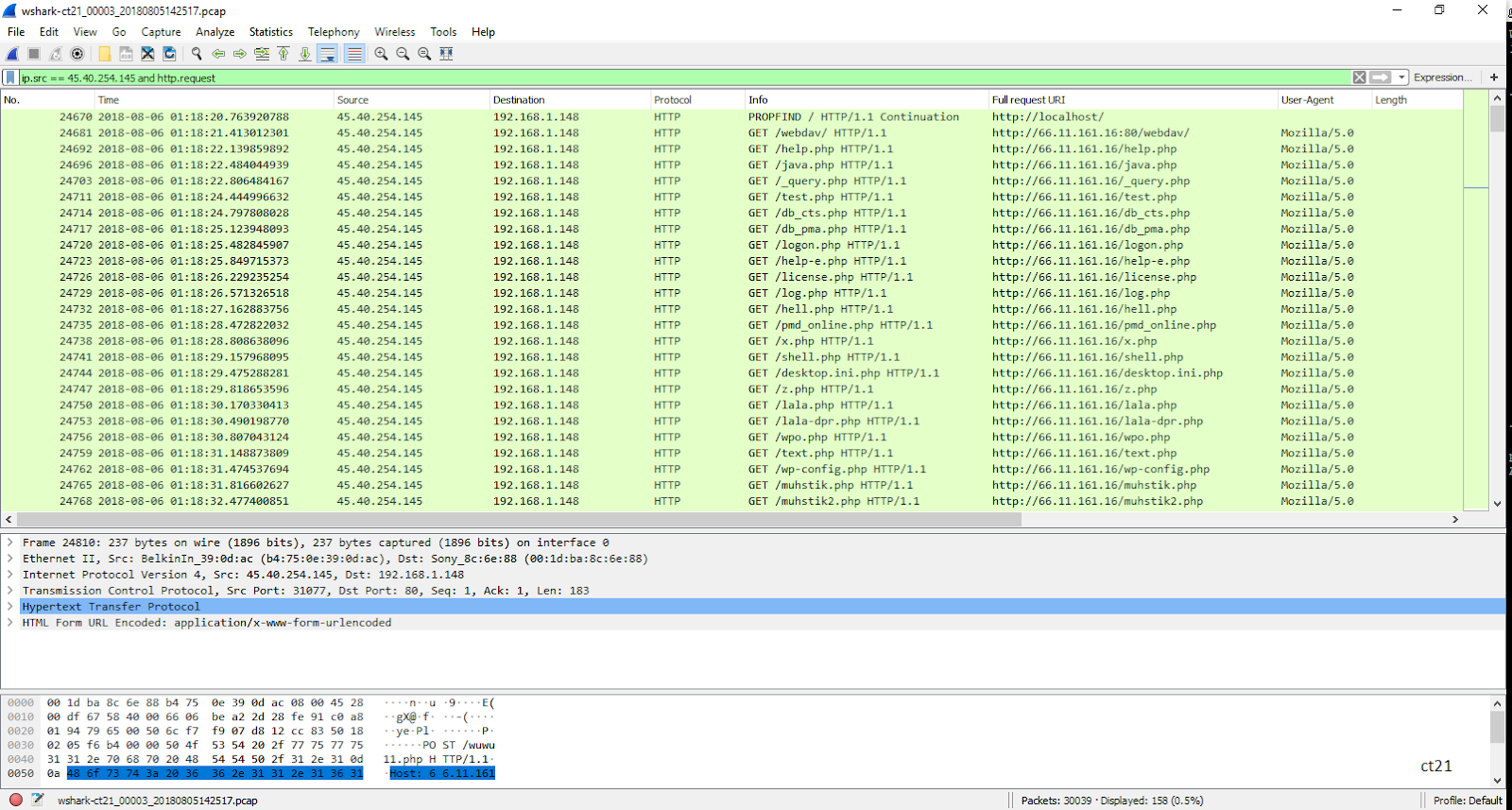
              As a Security Analyst, will be analysis unknown requests on web server or known exploits. 
              HTTP response codes determines the errors corresponding to the requests which describes if the traffic is malicious or not. 

              The source ip is scanning unknown pages and response is 404 not found. Since, there are so many unknown requests which determine the traffic is suspicious. 
              PROFIND request is used for Remote Code Execution. 

              Attacker IP: 45.40.254.145 
              Exploit Attempt

              http response code

              Conclusion, Remote code execution was attempted from the attacker IP and exploit was unsuccessfully since http response was 404 - Not Found using packet analyzwe.

              Great packet analysis done by Manikandan Ramkumar on ct21-Webserver >> Link

              In addition, IDS rule match for RCE for the attacker IP

              Snort Rule  


              Log/Data Analysis (SIEM)


              Data analysis helps in more depth to know more about the attacker such as counts, reputation, Geo location and much more.

              Overview/Dashboard gives a great summary of the logs collected in a user friendly structure which help to investigate accurately.

              Alienvault Analysis


              Top host are being listed to priority the analysis.

              Once the log is collect the tool convert the log data into EVENTS to analysis.

              Attacker IP: 193.112.100.154, Events: 400 errors

              Event

              Further investigation, 

              Filtering the source IP and finding all the events triggered.


              Investigating the Event and verify the logs data. Log indicates the reason for error code 404. 

              "POST /w.php HTTP/1.1"  >> POST request 


              IDS event triggered as packet matches the signature (rule) placed.


              IP reputation >> Link


              External is having bad reputation. Remote Code Execution attempted and unsuccessful. 

              As a solution, block the external IP on the firewall/End device so that the traffic is reset to the exploit attempts. 

              Sumo Logic Analysis

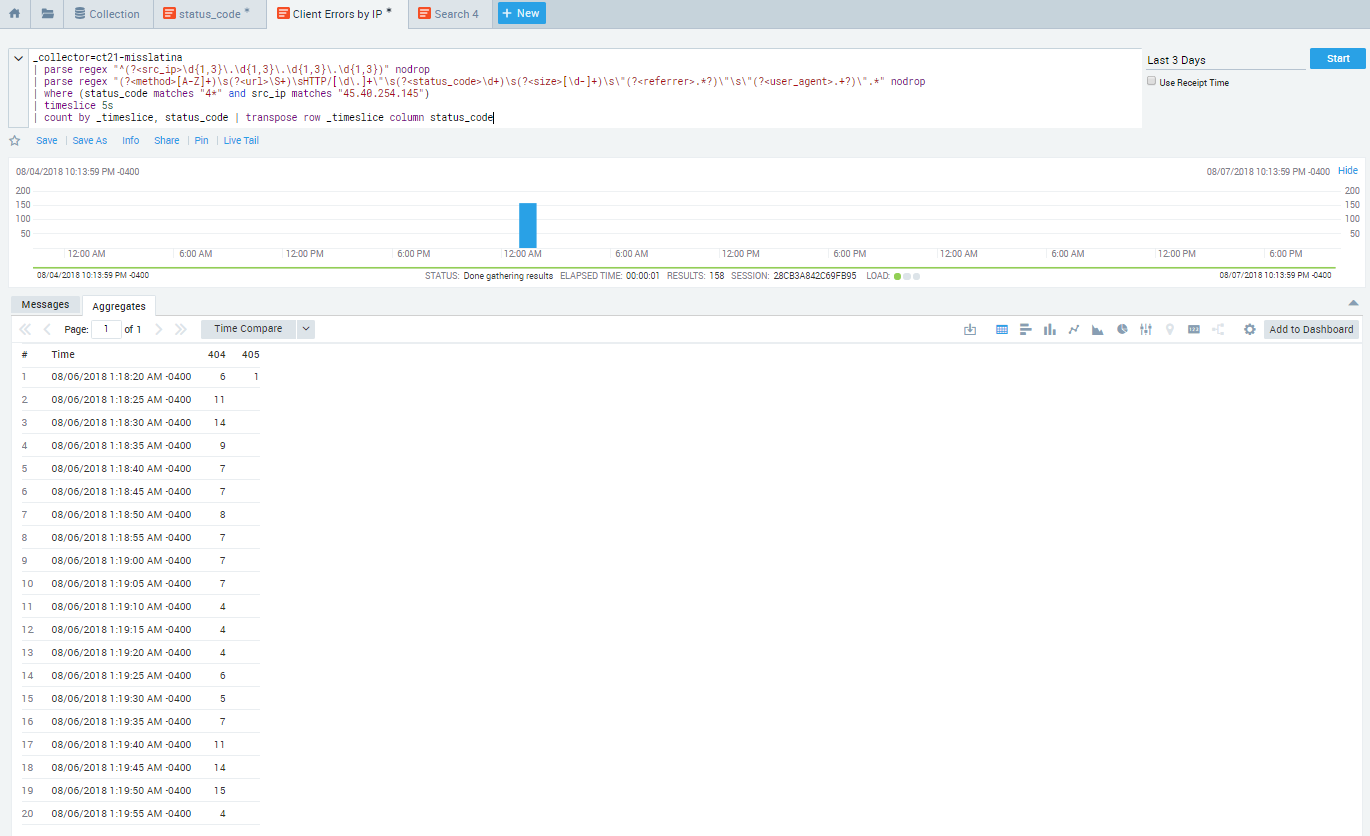
              Data analysis for http status code will summarize the traffic on the Web Server.
              Error code 404 is more compared to others. 


              Filtering the search for error code = 404 with corresponding source ip.  


              Source IP: 45.40.254.145, most number of counts. 


              Filtering to Source IP =  45.40.254.145, Time intervals = 5s
              External hits are too fast and suspicious.


              Messages are the log file, observing the url from above screenshot external ip is scanning for a exploit on admin pages.

              Solution: Number of attempts is higher and GET request for admin pages confirm malicious activity from the external IP, block the external IP on the firewall/End device.


              In conclusion, working with open source tools and free version softwares with help to develop your security skills, know about exploits and there mitigation which will lead to a best Security Analyst personnel. 

              Phishing - Main Source for Cyber Attack

              What is Phishing?

              Phishing is similar to fishing, cyber criminals hooks a malware and wait until someone is caught. Cyber criminals hooks individual in the form of Emails, SMS, Calls, Replica of know websites and many more methods. In the case of a computer, once caught then the attacker is the owner of the computer or your important accounts credentials. In the case of SMS and Calls, scaring to get the personal information or credit card details and websites, login credentials. 


              Sometimes its hard to recognized that you are really being hooked or phished. 

              How this Phishing works? 

              I am using Email phishing example since its the most common and people are still getting hooked on emails. 

              Email was sent to me which went to SPAM but its not always the case. 

              Looking at the Email below is very obvious to be curious to know what invoice this email is talking about.  


              Once clicked on the link you are hooked but still can manage to get out of the danger.


              When you open the download file is when you are completely hooked and caught perfectly (danger zone). 


              As you can see there is no content on the file but just the marcos which is the malicious code to impact the computer. 

              At this point, you might just ignore the file but you are phished and on background few process are running and trying to connect to malicious servers to submit data, also called as C&C (Command-and-control).

              Following is the background analysis on the file downloaded.

              My system configuration: 

              ***THIS ANALYSIS IS PERFORMED IN VIRTUAL ENVIRONMENT***
              ***PLEASE DON'T USE THE LINK ON YOUR ACTUAL COMPUTER FOR ANALYSIS***


              This is the traffic of the impacted computer started to contact to GET more files to compromised the system entirely.   


              Above process show how an email phishing works and compromise the system.

              How to detect a phishing method?

              The most important to detect phishing emails is from where is came from, Name is not important email id is the most important part to see. 

              Below screenshot points out important things to watch before clicking or downloading a file. 
              • Email ID (@"domain-name") 
              • Wrong details
              • Unknown link (Suspicious link)
              • Grammar
              • File Name (once downloaded)
              This are few important points which confirms that its a phishing email which can be deleted or reported. 


              Similarly, things to check on phishing websites: 
              • Domain Name (URL)
              • Grammar
              • Copyrights
              • Website certificate (https://)

              How to verify if file is malicious or not? 


              VirusTotal ( https://www.virustotal.com ) is one of the best open source analyzer for files, website and domain names. It gives a good idea about a file is malicious or out according to the Anti virus companies scan or signatures. 

              This is the link for the malicious file downloaded. 

              For more details analysis, 

              Hybrid Analysis ( https://www.hybrid-analysis.com/ ) is a good tool for detail analysis more suitable for IT professionals. 


              ##Take Away##

              PERSONAL DATA or INFORMATION is an important part for an individual/organisations which is directly proportional to MONEY and REPUTATION. 

              Don't be to busy which cause you to get hooked and compromised. Be safe and careful in this Cyber World.  

              Quality of Service (QoS) - Voice, Video, Data Traffic

              Where we need Quality-of-Service(QoS) in a Network?

              Ans: In Converged Architecture/Unified Communication network where Voice/Video/Data services are implemented.

              Converged Architecture 

              Converged Architecture - Combination of Multiple Services

              Data:

              Data Service is an Best Effort Services and it is Insensitive. It using CRC for data integrity check i.e. ACK, REQ, SYN, FIN etc.

              Voice and Video:

              Real time services, **remember - stored voice & video in computer is data. 
              Most important thing for Voice and Video is Quality-of-Experience (QoE) which depends upon three things:
              • Delay (Latency)
              • Jitter (Inconsistent Delay)
              • Drops

              Voice

              • Real time service, IP phone, analog is converted into digital form or packet form.
              • Voice Packets are small (8 Kbytes - 64 kbytes)
              • Voice Concealment Program is used
              • Drop are allowed in Voice, 1 drop in 10000 voice packets (more than this is not very good QoS)
              • Delay is not allowed in Voice, so called Delay Sensitive Communication/Low Latency communication.

              Video

              • Real time service, High definition (8.5 mb) and Standard Definition (2.5 mb)
              • Packets are in form of frames.
              • Need Consistency of Video frames
              • Frames - I (Index), B (Actual Video) , P (Padding) - Blank screen means I frame is dropped, Glitch means B frame is dropped.
              • Drop are not allowed in video, so called as Drop Sensitive Communication. 1 drop in 100000 video packets not more otherwise is not good.
              • Delay is allowed, up to 200ms. 

              *******IMPORTANT********
              If there is a device with input DATA-700 MB, VOICE-64 kb, VIDEO-8 MB and device having 5 MB BW Output, so which packet will go first, then second and last?


              ANS: 
              1. VOICE because Delay not allowed.
              2. VIDEO because Delay is allowed and data goes first then video will go into buffering and if it overload it will drop.
              3. DATA because it is insensitive so last.
              For this, devices should be capable of Classifying and Prioritization the packet which is called as QoS.
              ********IMPORTANT********* 


              Configuration:

              Coming up....

              [http://www.cisco.com/c/en/us/support/docs/switches/catalyst-3750-series-switches/91862-cat3750-qos-config.html

              &

              http://www.cisco.com/c/en/us/td/docs/ios/solutions_docs/qos_solutions/QoSVoIP/QoSVoIP.html]


              ★CT21

              Reference: https://rstforum.net/ (CCNA training)

              Three Tier Architecture - Network Design


              Three Tier Architecture (Networking) or Hierarchical LAN Network Model


              • Access Layer
              • Distribution Layer
              • Core/Backbone Layer


              Fig:1

              Access Layer: (Switches/L2)

              Provides work-group/users access to the network. Features includes:
              • Highly Available
              • Broadcast suppression
              • Fully Redundant
              • Highly Scalable
              • No Single point of failure (NSPOF)
              Functions:
              • Access Capability (Connectivity)
              • Port Security
              • VLAN creation
              • L2 access security
              • Spanning tree

              Distribution Layer:(Routers/Switches/L3) 

              Most important layer is Distribution because maximum traffic management will happen in the same building so maximum work load on Distribution Layer.

              Provides policy based connectivity and controls the boundary. Features & Functions includes:
              • Maximum Traffic Manipulation - Manage & Handling traffic
              • Route and VLAN aggregation
              • Inter-VLAN routing
              • Filtering and Security (ACL)
              • Trunk termination
              • Redundancy and Load Balancing
              • QoS 

              Core Layer: (All to All Connectivity)

              Provides Fast Transport. Features & Functions includes:

              • Fast (High Speed) Switching
              • L2 Transport only
              • No Traffic Manipulation
              • High Reliability
              • Fault Tolerance
              • QoS

              Process:

              Very Important: Bring as much L3 switching/Routing as possible to control broadcast and void VLAN in your design because VLAN is use for security, separation and management.

              Following diagram describe High Available, Secure, Better QoS and Highly Scalable design.   


              Fig:2


              ★CT21
              Reference: https://rstforum.net/ (CCNP training) | Cisco Networking Academy | CCDA 200-310

              Address Resolution Protocol (ARP) Poisoning and Analyzing with Wireshark.

              Prerequisites: Knowledge on ARP process. [http://www.erg.abdn.ac.uk/users/gorry/course/inet-pages/arp.html]

              Lab Setup for ARP Poisoning


              In this lab we are assuming that the Attacker is compromised the network, so its in same LAN segment.

              Normal ARP between User and Server will have ARP cache (table) as below:
              • User PC
              • Server  


              Now the attacker does a ARP Poisoning in the network, now the ARP tables changes as below:

              • User PC
              • Server


              ARP Poisoning: Server and User will be communicating with the attacker PC even though they think they are communicating with each other. This kind of attack can be easily be detected with the help of Packet Analyzer or checking the ARP table.

              Wireshark Analysis on ARP Poisoning


              When apply ICMP, we get the response from the destination but the path is via Attacker PC. As you can see the wireshark packet capture, packet from User is going Attacker then its going to destination and via versa.
              Also, Attacker learns the layer 2 information on the LAN segment and changes the ARP table.

              [ For more details -  http://www.cisco.com/c/en/us/products/collateral/switches/catalyst-6500-series-switches/white_paper_c11_603839.html ]


              ★CT21